Frontend System Design notes
Notes I have taken preparing for System Design interview with a focus on Frontend.
Latency is king and Accessability is its queen
Amazon found that every 100 milliseconds of delay costs them 1% in sales. That’s how closely performance and revenue are linked.
Google experimented and found that a 500 ms delay in search reduces traffic by 20%. A slow experience doesn’t just frustrate users; it drives them away.
Google prioritizes mobile-friendly and accessible sites in search rankings. Making your website accessible can also improve its SEO
How browser renders contents
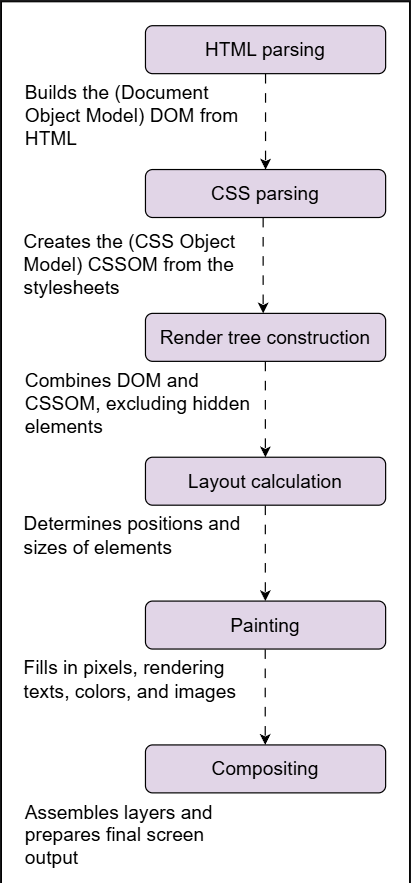
Source: https://www.educative.io/courses/grokking-frontend-system-design-interview
Metrics
TTFB: Time to First Byte
TTI: Time to interactive (time so that the user can interact with the page).
LCP: Largest contentful paint measures the time it takes for the largest visible element on a page to load, impacting user-perceived performance and overall page experience.
FID: First input delay measures the time between a user's first interaction (click, tap, or key press) and the browser's response, reflecting the site's responsiveness and interactivity.
Performance:
Factors affecting performance
Several factors influence the performance of a frontend system:
Network latency: The time data takes to travel between the client and server can affect the performance. If a website loads content from a distant server, users may experience noticeable delays.
Render-blocking resources: External scripts and stylesheets that prevent content from being displayed, resulting in performance issues. A website with multiple large CSS files may delay rendering until all styles are loaded, causing users to see a blank screen.
Large asset sizes: Heavy images, videos, and fonts can slow page load times. An e-commerce site using high-resolution images without optimization may frustrate users by slowing product page loads.
Inefficient code: Poorly optimized JavaScript, excessive reflows(Reflows occur when the browser recalculates the layout of a web page due to changes in elements, such as resizing, adding/removing nodes, or modifying styles.), and redundant CSS can degrade performance. A web page with unnecessary JavaScript loops on every scroll event can slow interactions and make the user interface (UI) laggy.
A tree-shaking-enabled bundler (like Webpack) could help remove dead code which decreases Page size.
Use dynamic import for only needed section
Don’t load the whole UI library
Third-party dependencies: External libraries and ads can introduce delays in rendering. For example, A website embedding multiple third-party analytics scripts may experience longer load times as each script needs to be fetched and executed.
Network
Client cache (TTL policy we can control)
Browser cache
Mobile Cache
Desktop Cache
Debouncing is a technique used to delay a network request until the user stops performing an action for a certain amount of time. It prevents sending too many unnecessary requests to the server. It’s very common in search inputs, autocomplete, filtering, and resize events
Minimize dependency packages
Minimize CSS
Compress assets and store in CDN
Use Gzip or brotli for compression
Gzip works by compressing repeating characters.
Brotli works by that + it has dictionary of 120k most common words + Huffman encoding + Brotli splits file into meta blocks where it encapsulates simialar data together and uses different optimizations (e.g. HTML tags is dictionary)
Use HTTP2 for multeplexing and we can leverage that for bundle splitting
Diving deep Optimization techniques
Selecting the right HTTP version can make your site load faster and handle more users. Each version HTTP/1.1, HTTP/2, and HTTP/3 offers specific improvements tailored to different needs.
HTTP/1.1 handles one request at a time over each connection, often causing delays head-of-line blocking (Head-of-line blocking is a performance issue where one slow request delays all others in a queue, even if they're ready to proceed).
HTTP/2 introduces multiplexing, binary framing, and header compression, allowing multiple requests over one connection for faster loading.
- With HTTP/2 Server Push, the server proactively sends essential resources to the browser before it requests them, reducing load time and enhancing user experience
HTTP/3 builds on HTTP/2 but uses QUIC (QUIC (Quick UDP Internet Connection) is a modern transport protocol that reduces latency by combining the best of TCP and TLS over UDP, enabling faster, more reliable connections.) over UDP, enabling faster connections and better performance in unreliable network conditions.
Caching
HTTP supports content compression using algorithms like GZIP and Brotli, which reduce the size of HTML, CSS, and JavaScript files before transmission.
Browser caching, Service workers are background scripts that enable advanced caching by intercepting network requests and serving responses from local storage, even when offline., Cache-Control.
Developers can fine-tune behavior with directives like
must-revalidate, and manage content freshness through versioning (style-v2.css) or query strings (style.css?v=2.0) to ensure users receive the latest updates.stale-while-revalidateis an HTTP caching directive that serves stale content while asynchronously fetching and updating the cache with fresh content in the background.ETag stands for Entity Tag. It’s a string (often a hash) that the server generates for a specific version of a resource (like a webpage, image, or JSON response).
- is a mechanism used in HTTP to check whether a resource on a server has changed since the last time the client (browser or app) fetched it. It’s mainly used for caching efficiency, so clients don’t download the same resource unnecessarily
Layer promotion for optimized rendering
Hint | Purpose | Priority | What it does | When to use |
|---|---|---|---|---|
preload | Load a resource ASAP | 🔴 High | Downloads resource immediately | Critical resources |
prefetch | Load resource for future navigation | 🟡 Low | Downloads when browser idle | Next page resources |
preconnect | Prepare connection | 🟢 Very low | DNS + TCP + TLS handshake | External domains |
Overusing preload can overwhelm the browser and slow down the page instead of speeding it up. It may consume too much bandwidth early on, delaying more critical resources like the main content. This leads to resource contention, longer load times, and worse performance scores like Core Web Vitals.
To handle it properly, only preload essential assets that are needed immediately, such as key fonts, hero images, or scripts required for above-the-fold content. Avoid preloading assets that aren’t used right away.
Reducing render-blocking resources by using
asyncand service workers- Use those for critical stuff like fonts
Rendering
Use shimmer loading effect (Placeholders) for dopamine rewarding.
Reduce DOM writes by updating DOM lazily using Virtualization
Virtualization calculates the viewport and updates DOM items within that range only
This offers two major performance advantages:
Diffing: The framework compares the new virtual DOM with the previous one.
Batching: Only the changes are grouped and applied to the real DOM in a single, optimized update cycle.
Use flat CSS class names and avoid hierarchy to save browser’s time determining the parent in the CSSOM stage
For animations, try using CSS because it leverages GPU instead modifying the layout which uses CPU and is slower as it updates the whole layout.
Put the most important CSS and JavaScript directly inside the HTML, instead of loading them as separate files, so the page can render faster (for above the fold features).
Use
deferwhich is an attribute for<script>tags that tells the browser: Download the script now, but execute it later after HTML parsing is finished.
Diving deep
GPU acceleration boosts rendering performance, the next step is understanding layer promotion a technique that takes full advantage of the GPU. Layer promotion involves isolating elements by placing them on their own GPU-accelerated compositing layers, allowing them to update independently without triggering costly reflows or repaints. This helps minimize the work needed during rerendering as only the promoted layer is updated when changes occur.
This is especially crucial for frequently changing elements, like animated buttons or scrolling components. By isolating them on their own layer, visual updates occur independently, preventing unnecessary re-renders of the entire page.
Layer promotion happens in multiple ways; the two common ways are:
Browser-driven layer promotion: The browser may automatically promote elements with properties like
transform,opacity, orfilterif it detects frequent updates.Developer-controlled layer promotion: Developers can hint at promotion using
will-change, allowing the browser to optimize rendering in advance, or force it withtranslateZ(0), immediately moving the element to a GPU-accelerated layer for smoother performance.
This code below tells the browser that the element is likely to change, prompting it to allocate a separate GPU layer for more efficient handling.
.carousel-item {
    will-change: transform;
    transition: transform 0.5s ease;
}
While layer promotion can enhance performance, overusing it may lead to excessive GPU memory consumption and increased overhead. It’s best to promote only those elements that genuinely benefit from hardware acceleration.
For example, to optimize an image carousel, promoting only the active image and its immediate neighbors to separate GPU layers prevents unnecessary re-rendering. Instead of repainting the entire carousel, only the changing elements update, ensuring efficient resource usage.
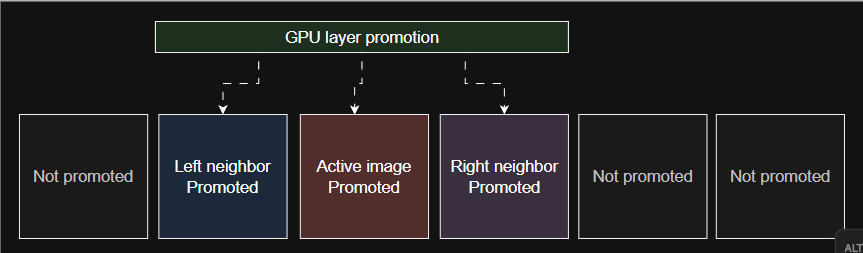
Source: https://www.educative.io/courses/grokking-frontend-system-design-interview
SSR vs CSR
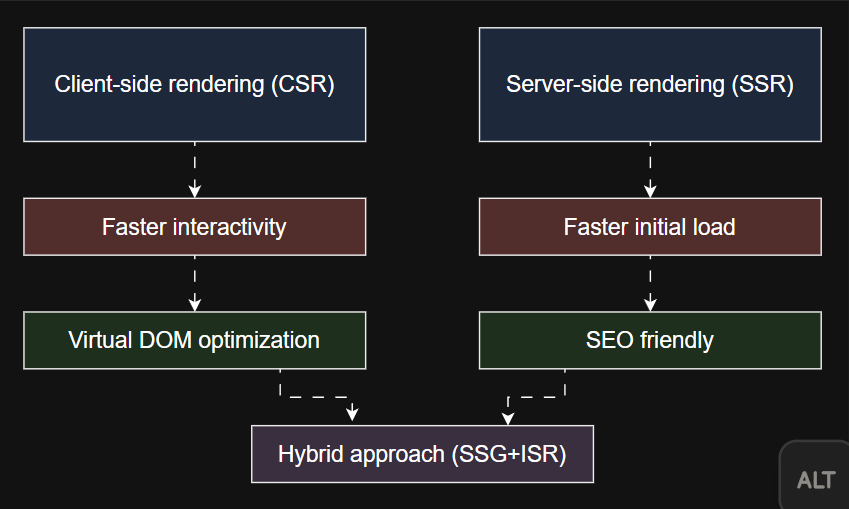
Source: https://www.educative.io/courses/grokking-frontend-system-design-interview
Incremental static regeneration (ISR):
Incremental static regeneration (ISR) solves SSG’s biggest limitation by allowing selective page updates after deployment, without requiring a full site rebuild. Once a site is deployed, ISR enables specific pages to be regenerated in the background whenever new data becomes available, ensuring that content stays updated without affecting the entire site. This means websites can maintain the speed and efficiency of static pages while still reflecting fresh content over time, making it ideal for blogs, news sites, and e-commerce platforms where some information changes frequently.
Q: How does the choice between CSR and SSR affect real-time applications like chat platforms or stock market dashboards?
A: Real-time applications like chat platforms or stock market dashboards benefit more from client-side rendering (CSR) because they require frequent UI updates without full page reloads. CSR allows dynamic content updates using WebSockets or API polling, ensuring low latency and high interactivity. However, initial load times may be slower, so techniques like server-side hydration or edge caching can help balance performance.
Q: What trade-offs should developers consider when choosing between SSR and CSR for an e-commerce website with frequently changing product details?
A: For e-commerce sites with frequently changing product details, server-side Rendering (SSR) is ideal for fast initial loads and SEO optimization, ensuring search engines index product pages efficiently. However, SSR alone can slow down dynamic interactions like cart updates. A hybrid approach, where SSR is used for product pages while CSR handles real-time updates, provides performance and interactivity.
Issue | Cause | Optimization Technique |
|---|---|---|
Large DOM size | Too many nodes, deep nesting | Reduce DOM complexity, use |
Layout thrashing | Frequent DOM updates | Batch updates using |
Slow initial load | Large, deeply nested HTML | Reduce DOM depth, use semantic elements. |
Slow CSS parsing | Complex selectors, large stylesheets | Use simple selectors, avoid deep nesting. |
Excessive repaints | Overuse of CSS effects (box-shadow, filter) | Use |
Unnecessary JS execution | Excessive unused JS | Use code splitting, dynamic imports. |
Render-blocking resources | Synchronous CSS/JS | Load scripts with |
Heavy JS execution | Long-running scripts | Use |
Inefficient compositing | Too many layers, stacking contexts | Optimize layering, use |
Overuse of GPU layers | Excessive hardware acceleration | Use |
Blocking third-party scripts | Slow-loading ads, analytics scripts | Load scripts asynchronously or via service workers. |
Slow SPA rendering | Excessive client-side rendering | Use SSR, SSG, ISR where needed. |
Inefficient list rendering | Large lists slowing down UI | Use virtualization ( |
Unoptimized fonts | Large font files, too many weights | Use |
Image rendering optimization techniques
Images often contribute the most to a web page’s payload, making their optimization a critical first step in improving load times. Here’s how we can achieve optimal results:
Choosing the right image formats: Selecting the appropriate format balances quality and file size. Traditional formats like JPEG are efficient for photographs, but modern formats like Web Picture Format (WebP) and AV1 Image File Format (AVIF) provide superior compression with minimal quality loss.
WebP supports lossy and lossless compression, often producing files 25–35% smaller than JPEG while maintaining visual integrity.
AVIF offers even better compression efficiency, reducing file sizes further while preserving high-quality visuals.
SVGs (scalable vector graphics) are perfect for logos and icons, offering infinite scalability without pixelation. They are lightweight and can be manipulated using CSS and JavaScript, allowing dynamic visual effects without performance trade-offs.
Responsive and lazy loading images: To optimize responsiveness, the
srcsetattribute enables browsers to select the most appropriate image resolution based on the device’s screen size. This conserves bandwidth while ensuring crisp visuals on all screens. Lazy loading further enhances performance by deferring the loading of offscreen images until the user scrolls near them. Theloading="lazy"attribute significantly reduces initial load times, benefiting content-heavy websites like social media feeds and e-commerce platforms.
Javascript
Understanding how the browser processes scripts is essential to improving JavaScript performance. JavaScript goes through a cycle of parsing, compilation, execution, and interaction with the rendering pipeline, as shown in the image below:

Source: https://www.educative.io/courses/grokking-frontend-system-design-interview
Memory handling
Event listeners are functions attached to DOM elements that, if not properly removed, can keep references alive and prevent garbage collection, leading to memory leaks. Poor memory can be caused because of them and closures, and unintended global variables
Avoid memory leaks: Use
WeakMapfor event bindings so memory is released automatically when associated elements are removed.Optimize object and array usage: Avoid creating too many objects or inefficiently storing data. Use
ArrayBufferandTypedArraysfor large or binary data to reduce overhead.Encourage garbage collection: Set unused references to
nullor reassign them to help the GC identify and free memory.Limit event listener footprint: Remove unnecessary listeners and use event delegation for shared parent elements to minimize retention.
Handle frequent UI updates efficiently: Instead of triggering reflows on every scroll or input, apply throttling or debouncing techniques.
Scenario | Without Optimization (High Load) | With Optimization (Efficient Execution) |
|---|---|---|
Continuous scroll events | Executes function for every pixel. | Executes function at fixed intervals (throttling). |
Search input event | Triggers request on every key press. | Delays execution until user stops typing (debouncing). |
Large DOM manipulations | Blocks UI with frequent updates. | Batches updates for smoother rendering. |
Virtualization pool
A virtualization pool is a collection of pre-allocated, reusable resources designed to minimize the overhead of frequent creation and destruction of UI elements. It optimizes resource management in virtualization by reducing performance costs associated with dynamically generating elements, such as DOM nodes or memory objects. Instead of creating new resources on demand, the virtualization pool efficiently recycles and assigns them dynamically, ensuring smoother performance and better scalability.
Here’s how it works:
Reusable resources (e.g., DOM elements or objects) are created once and stored in a pool.
When a new resource is needed, it is allocated from the pool instead of being created.
When no longer needed, the resource is returned to the pool for reuse.
The key benefits of a virtualization pool include reduced memory allocation overhead, minimized garbage collection pressure, and optimized performance by limiting DOM reflows and repaints.
Virtualization has recycling too and is good when re-using expensive items to create, in an infinite scrolling list, only a limited number of list items are rendered at any given time. As the user scrolls, items leaving the viewport are recycled to display new content.
JS internals
In JS, call stack just register callbacks .. callbacks from Web API and event handlers are stored in Task Queue waiting to be executed some time in the future.
It is the responsiblity of the Even Loop to check if the Call stack is empty, if so then it pop callbacks from the task queue and place it in the call stack until the former is empty.
Microstack holds the
then, error, finallyof promises, the function body after theawait.. themicrotaskqueueand newMutationObserver
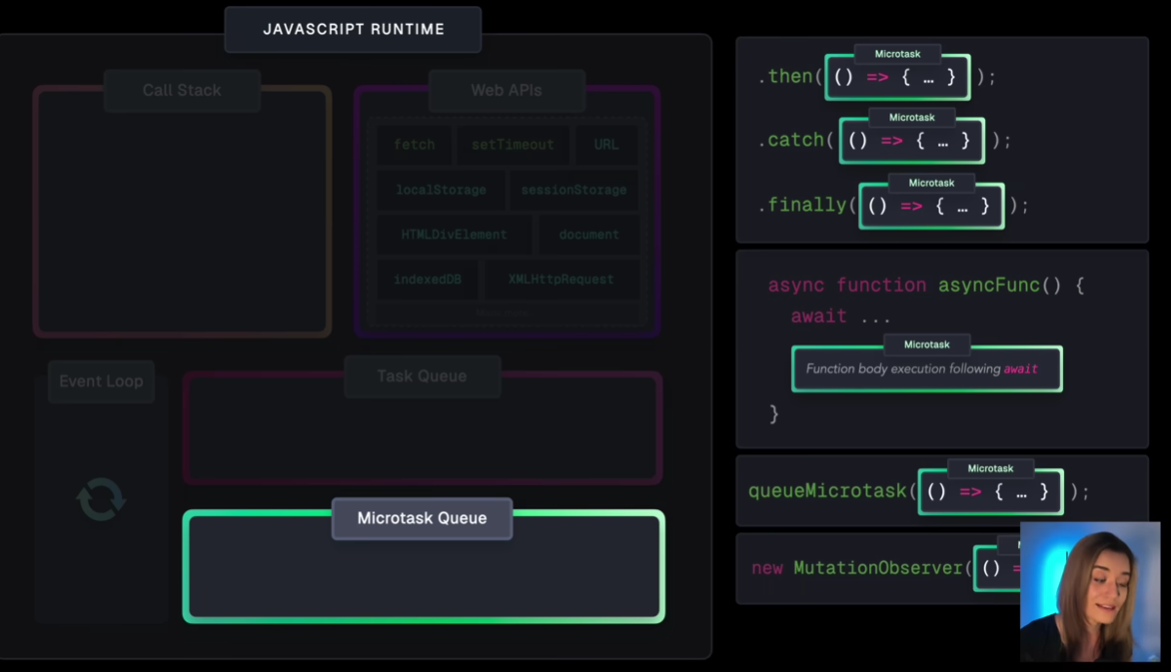
Source: https://www.youtube.com/watch?v=eiC58R16hb8
The event loop prioritises micro task queue, it first checks if it is empty (moves it to call stack if not) then proceeds to the task queue.
WebAPI stores the state of the promises and when the network responds, the promise reaction pushes the code to the micro task queue.
To optimize execution and improve responsiveness, developers should focus on three key strategies:
Offloading computations.
Using short-circuiting operations.
Implementing efficient event handling.
Use backend for expensive operations.
Event delegation: For event-heavy applications, event delegation is a great approach. Instead of attaching separate event listeners to each child element, we attach a single listener at a parent level, This approach exploits the concept of event bubbling, where an event on a child element bubbles up to its ancestors in the DOM tree. By hooking into the parent, you can catch events from all children.
Hydration: refers to attaching interactivity (JavaScript behavior) to a server-rendered HTML page. It lets the page become dynamic and responsive after being loaded. However, full hydration can be resource-heavy as it activates the entire page.
Consider using Web workers:
- A Web Worker is a JavaScript feature that allows you to run code in a separate background thread, independently of the main UI thread. This prevents heavy tasks from blocking the user interface.
Cache results in state/cookies
Split JavaScript into smaller chunks, load parts of the app only when needed (lazy loading), and remove unused code (tree-shaking)
Security
Encapsulate the DOM and disallowing it to be manipulated by external library, we achieve this by using Shadow DOM.
Prevent Cross-Site Scripting (XSS) by using React Input,
Content-Security-Policy: script-src 'self’Prevent Cross-Site Request Forgery (CSRF) by using a csrf token in the forms and
SameSitein cookies Prevents CSRF attacksSecure authentication cookies use:
HttpOnly: JavaScript cannot access cookie
Secure: Only sent via HTTPS
Store tokens in cookies only not localStorage because the attacker could do
localStorage.getItem("token")
Accessibility
Keyboard nav
Screen reader (aria lable)
Color contrast (Use tools like WebAIM contrast checker to verify contrast)
Alt text for images
Use
remunits for responsive design
Good to know:
Observer API & Infinite scrolling
The Intersection Observer API is a built-in browser API that allows developers to asynchronously observe changes in the visibility of elements relative to a viewport or another element.
Instead of constantly checking the scroll position manually, this API efficiently watches for when a designated element (like a loader) comes into view.
const options = {
  root: document.querySelector("#scrollArea"),
  rootMargin: "0px",
  scrollMargin: "0px",
  threshold: 1.0, // A threshold of 1.0 means that when 100% of the target is visible within the element specified by the root option, the callback is invoked
};

const observer = new IntersectionObserver(callback, options);.
We can also use throttling or debouncing to reduce the number of requests when a user scrolls quickly.
We can cache the user's scroll position.
Misc.
A fast LCP means the largest visible element (like an image or heading) has loaded quickly, but if a page remains unresponsive to user input, it suggests a high first input delay (FID). The most common cause is long-running JavaScript execution from third-party scripts (such as analytics, ads, or social media widgets), which block the browser’s main thread, preventing the page from responding to user interactions.
HTTP Live Streaming (also known as HLS) is an HTTP-based adaptive bitrate streaming communications protocol developed by Apple Inc. and released in 2009
In Microfrontends, sharing state is essential (language, theme, tokens) so there needs to be a pub/sub or
postMessagefor iFrames, also every microfrontend should hold its own API prefix to avoid collision during routing.- Module federation is a feature of Webpack 5 that allows independently built and deployed JavaScript applications (like micro-frontends) to dynamically share code at runtime. It enables apps to expose and consume modules from each other without needing to recompile or bundle everything together.
Shell in SPA is persistent structure containing the header, footer, navigation, and other static UI elements and as the layout shell is persistent and reusable; once the shell is cached, subsequent visits can feel almost instantaneous, a major advantage over MPAs, which rerender and reload everything each time.
For Compatibility:
Progressive enhancement is a way of building websites and applications based on the idea that you should make your page work with HTML first. Only after this can you add anything else like CSS and JavaScript.
Responsiveness: The frontend must use flexible grids, media queries, and fluid layouts to ensure posts, images, and text scale properly across screen sizes.
Project Structuring
Strategy | Structure Style | Use Case |
|---|---|---|
Feature-based | Group by features or pages (e.g., | Modular teams, scalable feature sets. |
Domain-driven | Group by business domains (e.g., | Enterprise apps aligned with business logic. |
Layer-based | Group by role/function (e.g., | Clear responsibility separation across shared utilities or functions. |
Communications
WebSockets
A WebSocket connection starts with an HTTP connection established through a three-way TCP handshake. Afterward, an HTTP GET request is initiated to switch the protocol to WebSocket. The connection upgrade request can be accepted or rejected by the HTTP server. If the server is compatible with the WebSocket protocol and the upgrade request is valid, the connection is upgraded to a WebSocket connection. The response contains the status code 101 (Switching Protocols) and the value for the field, Sec-WebSocket-Accept.
Status code
101shows that the protocol is successfully upgraded and can send WebSocket frames.The
Sec-WebSocket-Keyis a base64-encoded 16-byte value that the server uses to verify that the upgrade request is coming from a legitimate client that understands the WebSocket protocol, and not a malformed HTTP request. This value is then encrypted using a hashing algorithm like SHA, MD5, and so on.The server decrypts the value of the
Sec-WebSocket-Keyand generates theSec-WebSocket-Acceptfield by prepending a Globally Unique Identifier (GUID) value to the client-providedSec-WebSocket-Key. The value ofSec-WebSocket-Acceptis also encrypted and sent back to the client, indicating that the server has accepted the connection upgrade.
It is difficult to scale WebSockets horizontally due to WebSocket’s stateful nature, both endpoints are bound to the channel, and we cannot add more machines to reroute requests and distribute the workload among different servers.
While horizontally scaling a single WebSocket connection is difficult, distributing different WebSocket connections to different servers can be achieved by an appropriate intermediary, such as a load balancer or an API gateway.
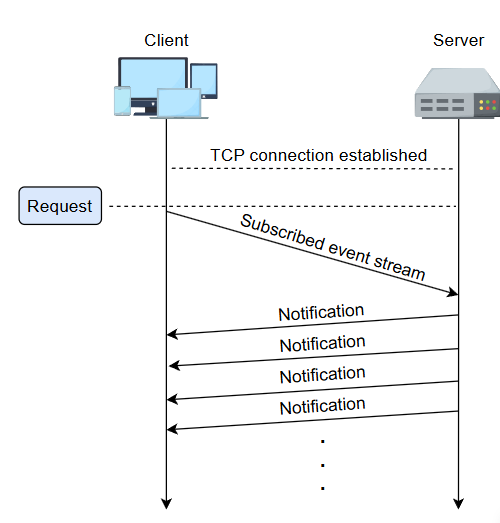
SSE
In SSE, the client requests the URL through a standard EventSource interface to enable an event stream from the server. Additionally, the client defines the text/event-stream under the Accept header in the request. Here, the event-stream represents a media type known as MIME (Multipurpose Internet Mail Extensions). Before initiating the request, the client-side application also checks the server-sent event support on the client (browser).
A Major drawback of SSE is that it only allows text-based streaming due to data format limitations, such as not supporting binary data. So, we can’t use it for other streaming data such as video, audio, etc.
Source: https://www.educative.io/courses/grokking-frontend-system-design-interview
REST
REST is a web architecture style that proposes some constraints that should be used to design web or mobile applications. However, HTTP is the protocol, or, in simple words, a method that enables us to achieve the constraints proposed by REST. Although HTTP was designed earlier than REST, fortunately, it has all the features that can be utilized to make the World Wide Web conform to the REST constraints. Therefore, HTTP is widely adopted in this regard.
RPC
code stub is an autogenerated client or server code that simplifies communication using remote procedure calls (RPCs).
Client stub: Allows clients to call remote methods as if they were local functions.
Server Stub: Handles incoming RPC requests and routes them to the actual service implementation.
Components | Description | |
|---|---|---|
Client stub | • Representation of the function in the client-side environment. | |
Runtime RPC | IDL | • Interface definition language, which is used to define functions at remote ends |
IDL compiler | • Generates client- and server-side compatible codes for client and server stubs | |
IDL header | • List of available functions that can be used by clients and servers | |
Server stub | • Representation of the function in the server-side environment. |
GraphQL
If it is possible to fetch only the desired information using the REST API, then why is there a need for GraphQL?
The partial response strategy, or filtering, is a flexible approach to getting the required information via REST APIs from a single endpoint. However, GraphQL benefits us the most in a case when we frequently need to retrieve desired responses from multiple endpoints at the same time.
GraphQL can reduce over-fetching by allowing clients to request exactly what they need, which is particularly beneficial for deeply nested resources or mobile UIs. If your UI is relatively static or if the overhead of adopting GraphQL is significant, a well-designed REST API with filtering capabilities can still be effective. It’s essential to weigh the benefits of flexibility against the complexity of implementation when deciding whether to switch to GraphQL.
API architecture styles | When to use | When to avoid |
|---|---|---|
REST | • When performing CRUD operations on resources. | • In the event driven systems. |
GraphQL | • When an application is gathering data from multiple data sources. | • In server-to-server communication. |
gRPC | • When building low latency, highly scalable distributed system. • To create a backend system with a large number of microservices. | • If the developer's or consumer’s language is not supported by the framework. |
QUIC (Quick UDP Internet Connections)
a. Runs over UDP
QUIC uses UDP instead of TCP. UDP is “connectionless,” meaning it doesn’t guarantee delivery or order by itself.
QUIC builds its own reliability and ordering mechanisms on top of UDP.
By doing this, QUIC can implement features like multiplexing multiple streams without TCP’s head-of-line blocking.
b. Faster connection setup
QUIC can establish an encrypted connection with 0-RTT (zero round-trip time) if the client has connected before.
First-time connection: 1 RTT for handshake (faster than TCP + TLS).
Subsequent connections: 0 RTT, data can be sent immediately.
c. Multiplexing streams
QUIC can carry multiple independent streams of data over the same connection.
If one stream experiences packet loss, it doesn’t block other streams (unlike TCP).
d. Built-in encryption
QUIC encrypts all packets by default using TLS 1.3.
This means no separate TLS handshake on top of TCP; encryption is built into the transport layer.
e. Connection migration
QUIC connections are identified by connection IDs, not IP addresses/ports.
This allows seamless connection migration (e.g., switching from Wi-Fi to mobile network) without dropping the connection.
Monitoring
Errors that occur in real users’ browsers are often the hardest to detect through testing alone, yet they’re the most critical to fix. To address this, frontend systems should integrate real-time monitoring and error-tracking strategies. Instead of waiting for users to report issues, developers can use tools like Sentry or Bugsnag to capture stack traces, user context, and error patterns from live environments. When paired with structured logging and alerting, these tools help developers prioritize and resolve issues faster, before users even report them.
Session replay
Custom event tracking (button clicks)
Real user monitoring (RUM) for performance metrics mentioned above
Mindset
Start by choosing the right API architectural style, communication protocol, and data format.
Define clear, modular, and purpose-driven API endpoints to support frontend interactions effectively.
Define optimized data models and API architectures that minimize over-fetching and under-fetching, ensuring that the frontend gets the data it needs in the most efficient format.
Think of data flow direction and state management.
Remember to add caching for offline, retry and fallback and actionable messages to the user.
Mext time you face the question: “Which architecture should I use?” don’t just follow trends. Ask:
Who are my users?
What matters more: discoverability or engagement?
Do I need instant feedback or fast searchability?
Am I designing for content or interaction?
The answers to these questions will guide you toward the right architecture, or combination of them, that’s functional and future-ready.
REDCAAP Framework
RE: Requirements in a chat application, functional requirements might include real-time messaging, typing indicators, message read receipts, and user presence updates. For a video streaming application, non-functional requirements might demand low buffering times, adaptive video quality, and fast content delivery.
D: Design Patterns:
MVC vs. MVVM vs. MVP: These architectural patterns define how UI, logic, and data interact.
SPA vs. MPA: This decision addresses how the application loads and navigates, whether through a single dynamic interface or multiple page reloads. Each has performance and SEO trade-offs.
SPA is good for highly interactive apps such as Twitter, dashboards, apps with notifications that needs realtime updates.
MPA is good for SEO heavy, documentation and large content apps such as Wikipedia, Amazon, New webistes.
Monolithic SPA vs. micro-frontend: Depending on scale and team structure, we’ll choose between a single bundled interface or multiple independently developed and deployed frontend units.
Component-based vs. monolithic UI: When building a UI, we must decide between building with reusable components or a more centralized approach, weighing modularity and performance.
Unidirectional vs. bidirectional data flow: How data flows through the application predictably in one direction or interactively in both directly affects state management and real-time responsiveness.
- Apps like Amazon or Netflix use this pattern in onboarding or checkout flows where modular forms need internal interaction centralized submission control.
C: Component and hierarchy:
How to break down a UI into independent, reusable components
The importance of a hierarchical structure
State management within components, avoiding unnecessary re-renders and optimizing updates and data flow direction.
A: Architecture
Choose the right API architectural style:
REST
GraphQL
RPC
Communication protocol:
- HTTP/1.1, HTTP/2 (Multiplexing), HTTP/3 (QUIC)
Data format:
JSON
XML
Binary (could go along with JSON especially with HLS).
Data Fetching (You can use more than one):
Polling
SSE
WebSockets
API endpoints (use functional requirements as reference point).
A: API design.
- Define optimized data models and API architectures that minimize over-fetching and under-fetching, use functional requirements as reference.
P: Performance optimization
Network
Rendering
JS
Accesibilty
Localization and i8n
Compatibility (with devices)
Security.